Stop scrolling.
Go pray.
Pick the apps that pull you away — Instagram, TikTok, X, whatever it is for you. When prayer time arrives, Salah Lock pauses them across your prayer window, and lifts the pause the moment you log that prayer. Nothing else changes about your phone.
Opt-in. Your app selection never leaves your phone.
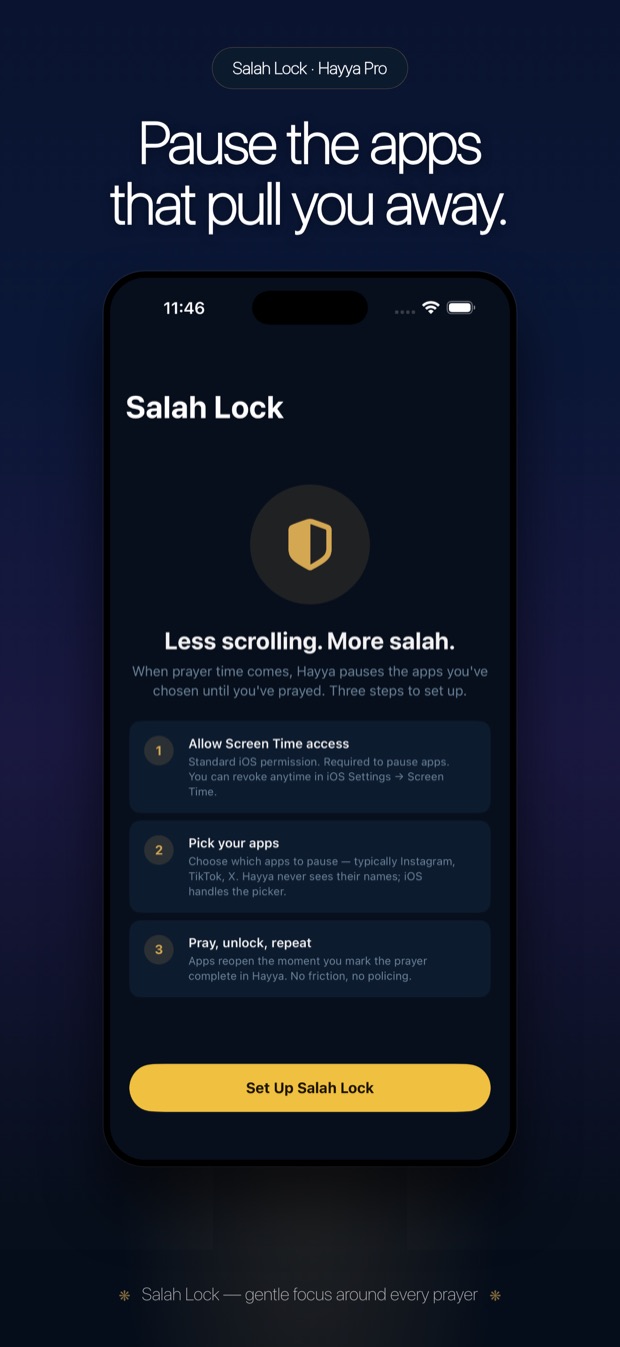
How it works
Three taps to set up. One tap to unlock.
No schedule to configure by hand — Salah Lock follows your actual prayer times, wherever you are.
Choose your apps
Pick individual apps or whole categories using Apple's Screen Time system. Whatever you pick is what pauses — nothing more.
Prayer time locks them
When each prayer window opens, your chosen apps pause automatically. No manual toggling, no remembering to turn it on.
Log your prayer to unlock
The moment you mark that prayer as prayed, the pause lifts — instantly, on the same screen, no waiting for a timer.
Your choice, not ours
How much you have to mean it
Salah Lock asks you to confirm you've actually prayed — how much friction that takes is a setting, not a fixed rule.
Instant
One tap logs the prayer and lifts the pause immediately. For the moments you just need to move on.
Affirm Default
Press and hold on “I have prayed [prayer name].” Enough of a pause to make it deliberate, without asking for more than that.
Oath Opt-in
Press and hold on “I bear witness that I have prayed.” An oath on God's name is heavy — this is here for those who want that weight, never forced on anyone who doesn't.
Not just Screen Time with a new name
Salah Lock vs. a generic app timer
Apple's Screen Time is genuinely useful — it just doesn't know what a prayer is.
| Generic Screen Time schedule | Salah Lock | |
|---|---|---|
| What unlocks it | A fixed clock time you set once | Logging the actual prayer — whenever that happens |
| Adjusts to shifting prayer times | No — you'd re-set the schedule yourself | Automatically, every day, everywhere |
| Confirms you actually prayed | No concept of this | Instant, Affirm, or Oath — your choice |
| Pauses during Haid | No concept of this | Yes — steps aside automatically |
| Genuine emergency | Requires a passcode override | A quiet "Emergency — Dismiss" option, always there |
Screen Time is free and built into iOS — Salah Lock's value isn't price, it's that the unlock condition is a prayer, not a timer.
The parts people ask about first
What Salah Lock does — and doesn't — do
- Your app selection stays on your phone. It's never uploaded, synced to a server, or visible to anyone but you.
- You are never truly locked out. A quiet "Emergency — Dismiss" option is always available during an active lock.
- It steps aside during Haid. When Haid Mode is on, nothing locks and nothing is counted as missed.
- It's opt-in, always. Turn it on for the apps you choose, turn it off with one tap, any time.
Questions
About Salah Lock, specifically
What is Salah Lock?
Which apps can it block?
What if I genuinely can't pray right now?
Is this just Apple Screen Time?
Do I have to take an oath every time?
Does it work during Haid?
Is Salah Lock free?
Related
More on blocking distraction and choosing Hayya
Block Distracting Apps During Prayer
A step-by-step setup guide, including what to pick first if you're not sure.
FivePrayer Alternative
An honest, feature-by-feature comparison against the other well-known salah lock app.
Best Prayer Times App for iPhone
What to look for beyond the lock: accurate times, a streak with mercy, real privacy.
The next prayer is coming. Be ready for it.
Try Salah Lock free for 14 days — cancel any time.
🍎 Download on the App StoreiPhone, iOS 17+ · Salah Lock is part of Hayya Premium